在java中使用poi来读取excel文件是一种比较普遍的做法,这里记录一下代码,免得以后又忘记如何读写excel文件。
下载poi
直接取官网下载poi包,Apache POI - Download Release Artifacts。
这里下载的是最新的3.17版本。
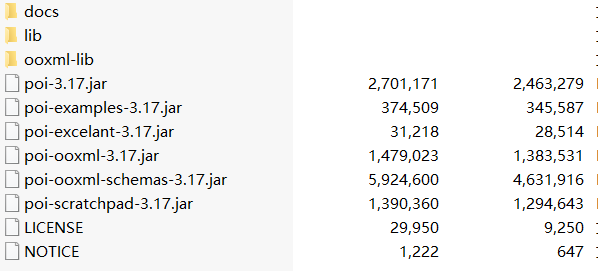
可以看到里面有很多jar包。
读取excel文件
在读excel文件的过程中,只需要用到poi-3.17.jar和poi-ooxml-3.17.jar两个jar包就够了。
在官方的
Quick Guide
中有读取文件以及读取单元格的例子,依照它就可以写出读取excel文件的代码:
1
2
3
4
5
6
7
8
9
10
11
12
13
14
15
16
17
18
19
20
21
22
23
24
25
26
27
28
29
30
31
32
33
34
35
36
37
38
39
40
41
42
43
44
45
46
47
48
49
50
51
52
53
54
55
56
57
58
59
60
61
62
63
64
65
66
67
68
69
70
71
72
73
74
75
76
77
78
79
80
81
82
83
84
85
86
87
88
89
90
91
92
93
94
95
96
97
98
99
100
101
102
103
104
105
| import org.apache.poi.openxml4j.exceptions.InvalidFormatException;
import org.apache.poi.ss.usermodel.*;
import java.io.File;
import java.io.FileInputStream;
import java.io.FileNotFoundException;
import java.io.IOException;
import java.util.ArrayList;
import java.util.List;
public class PoiWithExcel {
public List<String[]> parseExcelData(String path) throws FileNotFoundException {
File input = new File(path);
FileInputStream fis = new FileInputStream(input);
List<String[]> contents = new ArrayList<>();
Workbook workbook = null;
Sheet sheet = null;
try {
workbook = WorkbookFactory.create(fis);
sheet = workbook.getSheetAt(0);
} catch (IOException e) {
e.printStackTrace();
} catch (InvalidFormatException e) {
e.printStackTrace();
}
int row_num = sheet.getPhysicalNumberOfRows();
Row row = sheet.getRow(0);
if ( row == null )
return contents;
int col_num = row.getPhysicalNumberOfCells();
String[] content = new String[col_num];
for (int col = 0 ; col < col_num ; col++ ) {
Cell cell = row.getCell(col);
content[col] = myGetCellValue(cell);
}
contents.add(content);
for ( int r = 1; r < row_num; r++ ) {
row = sheet.getRow(r);
content = new String[col_num];
for ( int col = 0; col < col_num; col++ ) {
Cell cell = row.getCell(col);
content[col] = myGetCellValue(cell);
}
contents.add(content);
}
try {
workbook.close();
fis.close();
} catch (IOException e) {
e.printStackTrace();
}
return contents;
}
private String myGetCellValue(Cell cell) {
if ( cell == null )
return "";
String cellValue = null;
switch(cell.getCellTypeEnum()) {
case STRING:
cellValue = cell.getStringCellValue();
break;
case NUMERIC:
if (DateUtil.isCellDateFormatted(cell)) {
cellValue = cell.getDateCellValue().toString();
} else {
cellValue = String.valueOf(cell.getNumericCellValue());
}
break;
case BOOLEAN:
cellValue = String.valueOf(cell.getBooleanCellValue());
break;
case FORMULA:
cellValue = cell.getCellFormula();
break;
default:
cellValue = "";
}
return cellValue;
}
}
|